  • Home
  • Documentation
  • FAQ
  • Downloads
  • Support
  • Current Release Notes
  • Ferret Users Guide
    • Users Guide Index
    • Commands Reference
    • 1. Introduction
    • 2. Data Set Basics
    • 3. Variables & Expressions
    • 4. Grids & Regions
    • 5. Animations & Gif Images
    • 6. Customizing Plots
    • 7. Handling String Data Symbols
    • 8. Working with Special Data Sets
    • 9. Computing Environment
    • 10. Converting to NetCDF
    • 11. Writing External Functions
    • Glossary
    • Appendix A: Functions
    • Appendix B: PPLUS Guide
    • Appendix C: Ferret-Specific PPLUS Enhancements
  • Previous Release Notes
  • Tutorials and Demos
    • Ferret Tour
    • DSG files: Discrete Sampling Geometries Demo
    • Ferret sorting demo
    • Fast Fourier Transforms demo
    • Empirical Orthogonal Functions demo
    • Ferret objective analysis demo
    • Ferret Palette Demo
    • Map projections
    • Ferret polygon vector demo
    • Ferret Graticules demo
    • Ferret Polytube Demo
    • Ferret Polymark Demo
    • Ferret Constant-Array demo
    • Ferret land_detail demo
    • COADS Tour
    • Levitus Tour
    • Use OPeNDAP
    • Ferret binary read demo
  • PyFerret
    • PyFerret Downloads and Install
    • What is PyFerret?
    • Why use PyFerret?
    • PyFerret for the Ferret user
    • PyFerret command syntax: quick-start notes
    • PyFerret for the Python user
    • Graphics in PyFerret ?
    • New Ferret functionality
    • PyFerret Python functions and constants
    • PyFerret Python objects and methods
    • Ferret external functions in Python
    • Ferret Fortran external functions
    • PyFerret metadata-and-data dictionaries
  • OPeNDAP
    • OPeNDAP usage in Ferret
    • Use OPeNDAP Demo
    • Test OPeNDAP

Ferret Constant-Array demo

How to use Ferret "constant arrays" (e.g. "{1,3,5}")

Below is an annotated version of the script constant_array_demo.jnl

yes? go /help constant_array_demo
 
! Description: Demonstration of the {1, 3, 5} "constant array" syntax 

Constant arrays allow you quickly to enter lists of constant values.

SYNTAX: Constant arrays are comma-separated lists enclosed in curly braces. If the list needs to contain gaps (missing values), simply omit the element
Example:

yes? LIST {1,3,5}, {1,,5}
X: 0.5 to 3.5
Column 1: {1,3,5}
Column 2: {1,,5}
{1,3,5} {1,,5}
1 / 1: 1.000 1.000
2 / 2: 3.000 ....
3 / 3: 5.000 5.000
 

Note that a constant variable is always an array oriented in the X direction. To create a constant aray oriented in, say, the Y direction use YSEQUENCE

yes? STAT/BRIEF YSEQUENCE({1,3,5})
Total # of data points: 3 (1*3*1*1*1*1)
# flagged as bad data: 0
Minimum value: 1
Maximum value: 5
Mean value: 3 (unweighted average)

Examples:
Below are several examples illustrating uses of constant arrays


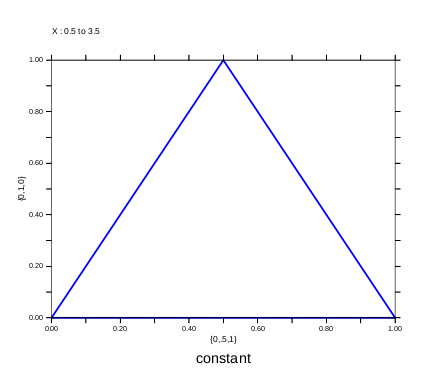
Ex 1) plot a triangle

yes? LET xtriangle = {0,.5,1}yes? LET ytriangle = {0,1,0}yes? POLYGON/LINE=8 xtriangle, ytriangle, 0


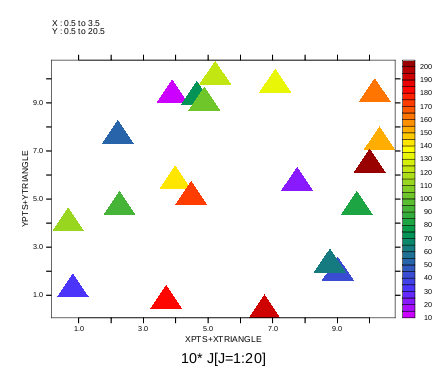
Ex 2) plot a series of triangles at data points
(See also polymark.jnl for a more automated way to do this: go/help polymark)

yes? LET xpts = 10*RANDU(j[j=1:20]+0) ! random X coordinatesyes? LET ypts = 10*RANDU(j[j=1:20]+1) ! random Y coordinatesyes? LET values = 10* j[j=1:20] ! value at each (x,y) pointyes? POLYGON xpts+xtriangle, ypts+ytriangle, values